បញ្ជាក់៖ នេះជាគំនិត និងរបៀបផលិតផ្ទាល់ខ្លួន។
របៀបធ្វើ
– កំណត់ទីតាំងចាប់ផ្តើម និងទីតាំងបញ្ចប់
– ដាក់តួសម្រាប់ថតនៅទីតាំងចាប់ផ្តើម ដោយមួយនៅខាងមុខ មួយនៅខាងក្រោយ
– ចុចថតរូប
– រំកិលកាមេរ៉ាស្របទិសដែលតួកំពុងធ្វើដំណើរទៅ
– រំកិលតួខាងមុខទៅមុខបន្តិច រួចចុចថតរូប
– រំកិលតួខាងក្រោយទៅមុខបន្តិច រួចចុចថតរូប
– បន្តធ្វើសកម្មភាពដដែលៗ (រហូតដល់ទីដែលលោកអ្នកកំណត់)
របៀបផលិតជាវីដេអូ
– យករូបថតមកបញ្ចូលក្នុងកម្មវិធី video editor ដែលលោកអ្នកប្រើប្រាស់ ដោយដាក់តាមលេខរៀងនៃរូប
– កំណត់ថេរវេលាមួយរូប ០,១ វិនាទី
– Save ជាវីដេអូ៕
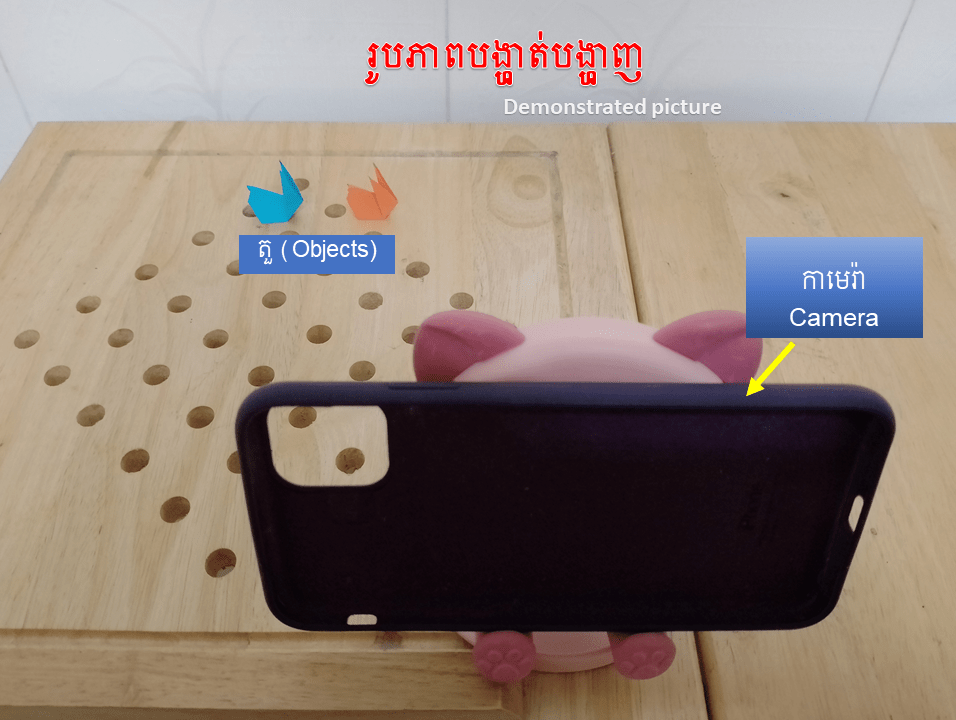
How to make a stopmotion of an object and the place moving at the same time
Note: This is an idea and method of Chantchhaya.
How to
– Set starting point and ending point.
– Put two objects, at the starting point, one is in front and one is behind.
– Take a photo of them.
– Move the camera to the same direction that the object is going.
– Move the front object, then take a photo.
– Move the behind object, then take a photo.
– Repeat the actions till they reach the ending point.
How to make a video
– Add all photos to the video editor that you use.
– Set a duration of each photo 0.1 second.
– Save it as a video.

 ស្រមោលព្រះចន្ទ្រ